v0.dev Pro Plan Deep Dive: Is the $20/month Price Tag Justified? [Benchmarked vs Free Tier] 목차 (Table of Contents) ▶ Understanding v0.dev's Credit-Based Pricing Model ▶ Breaking Down the Free, Pro, and Team Plans ▶ Evaluating Model Performance and Access by Tier ▶ Hidden Costs and Infrastructure Considerations ▶ Competitive Landscape: v0.dev vs. Cursor, Bolt AI, and Lovable ▶ Is the v0.dev Pro Plan Worth It in 2026? Understanding v0.dev's Credit-Based Pricing Model How v0.dev Allocates Monthly Credits Across Tiers How v0.dev Allocates Monthly Credits Across Tiers Let’s cut through the marketing noise: v0.dev’s credit-based pricing model isn’t designed for light experimentation—it’s a usage throttle disguised as flexibility. I’ve run production Next.js prototypes, internal tools, and AI-generated component libraries through both the Free and Pro tiers, and the credit burn rate is where the rubber meets the road. The Free tier gives you $5 in m...


Table of Contents
- The Achilles' Heel: Understanding Foldable Display Vulnerabilities
- The Microfiber Myth: Safe Cleaning Techniques Debunked
- Temperature Extremes: The Invisible Enemy of Polymer Stability
- The Case Conundrum: Protective Measures That Actually Matter
- The "Unfolding" Truth: Optimizing Hinge Mechanics
- The Repair Roulette: DIY vs. Professional Services Breakdown
- Software Strategies: Display Calibration and Burn-in Mitigation
- Future-Proofing Your Investment: Emerging Display Technologies and Maintenance
The Achilles' Heel: Understanding Foldable Display Vulnerabilities
Foldable displays. They promised a revolution – a seamless blend of smartphone portability and tablet-sized productivity. The reality, however, has been a bit more… fragile. To truly understand how to maintain these marvels of engineering, we need to delve into their inherent vulnerabilities. Forget the marketing gloss; let’s talk about the science.
The primary challenge lies in the material itself. Unlike traditional glass-covered screens, foldable displays rely on flexible polymers – often variations of polyimide films – to achieve their bending capabilities. These polymers, while incredibly thin and flexible, are significantly more susceptible to scratches, dents, and punctures than their glass counterparts. Think of it like the difference between a pane of glass and a sheet of sturdy plastic wrap. The plastic wrap is flexible, but also far easier to damage.
| Vulnerability | Description | Severity | Preventative Measure |
|---|---|---|---|
| Micro-scratches | Fine scratches caused by dust, debris, or abrasive cloths. | Medium | Use only specialized microfiber cloths and screen protectors. |
| Crease Formation | Permanent crease developing along the fold line due to repeated bending and material fatigue. | High | Minimize extreme folding angles and protect from pressure when folded. |
| Delamination | Separation of the polymer layers due to heat, humidity, or mechanical stress. | High | Avoid extreme temperatures and humidity; use a protective case. |
| Impact Damage | Cracks or punctures caused by dropping or hitting the device. | Critical | Use a robust case and handle the device with care. |
| Burn-in | Image retention caused by prolonged display of static elements. | Medium | Use dynamic wallpapers and avoid prolonged display of static images. |
Beyond the surface material, the folding mechanism itself introduces another layer of complexity. The constant stress and strain on the hinge and surrounding display area can lead to material fatigue and eventually, failure. This is why you’ll often see manufacturers advertising specific “fold counts” – a testament to the rigorous testing they perform to ensure a reasonable lifespan. However, even with the best engineering, this remains a point of significant vulnerability.
💡 Key Insight
Understanding the polymer-based construction and the mechanical stress on the hinge are crucial to preventing damage to your foldable display. Regular inspection and cautious handling are key.
Understanding the polymer-based construction and the mechanical stress on the hinge are crucial to preventing damage to your foldable display. Regular inspection and cautious handling are key.
The Microfiber Myth: Safe Cleaning Techniques Debunked
Okay, let's tackle a common misconception right off the bat: not all microfiber cloths are created equal. That "super-soft" cloth you use to clean your glasses? It could be doing more harm than good to your foldable display. The problem lies in the weave and the potential for embedded particles.
Generic microfiber cloths often have a looser weave and are prone to trapping microscopic dust particles and grit. When you wipe your screen with one of these, you're essentially dragging those abrasive particles across the delicate polymer surface, resulting in micro-scratches that accumulate over time, dulling the display and reducing its clarity. I learned this the hard way back in the summer of '24 at a tech convention in Vegas. I absentmindedly used a generic cloth from a booth to wipe down my brand-new foldable. Big mistake. Weeks later, under the harsh fluorescent lights of my studio, I saw the damage – a subtle haze of micro-scratches that made the display look… tired.
| Cleaning Method | Description | Pros | Cons |
|---|---|---|---|
| Generic Microfiber Cloth | Standard microfiber cloth used for cleaning various surfaces. | Inexpensive, readily available. | Can trap particles, causing micro-scratches. |
| Specialized Display Cloth | High-density, lint-free microfiber cloth designed specifically for delicate displays. | Minimizes scratching, effectively removes smudges. | More expensive than generic cloths. |
| Pre-Moistened Wipes (Display-Safe) | Individually packaged wipes with a gentle cleaning solution. | Convenient, removes stubborn stains. | Can leave streaks, some solutions may be too harsh. |
| Air Blower | Uses compressed air to remove loose dust and debris. | Completely non-abrasive, prevents scratching. | Ineffective for removing smudges or stuck-on particles. |
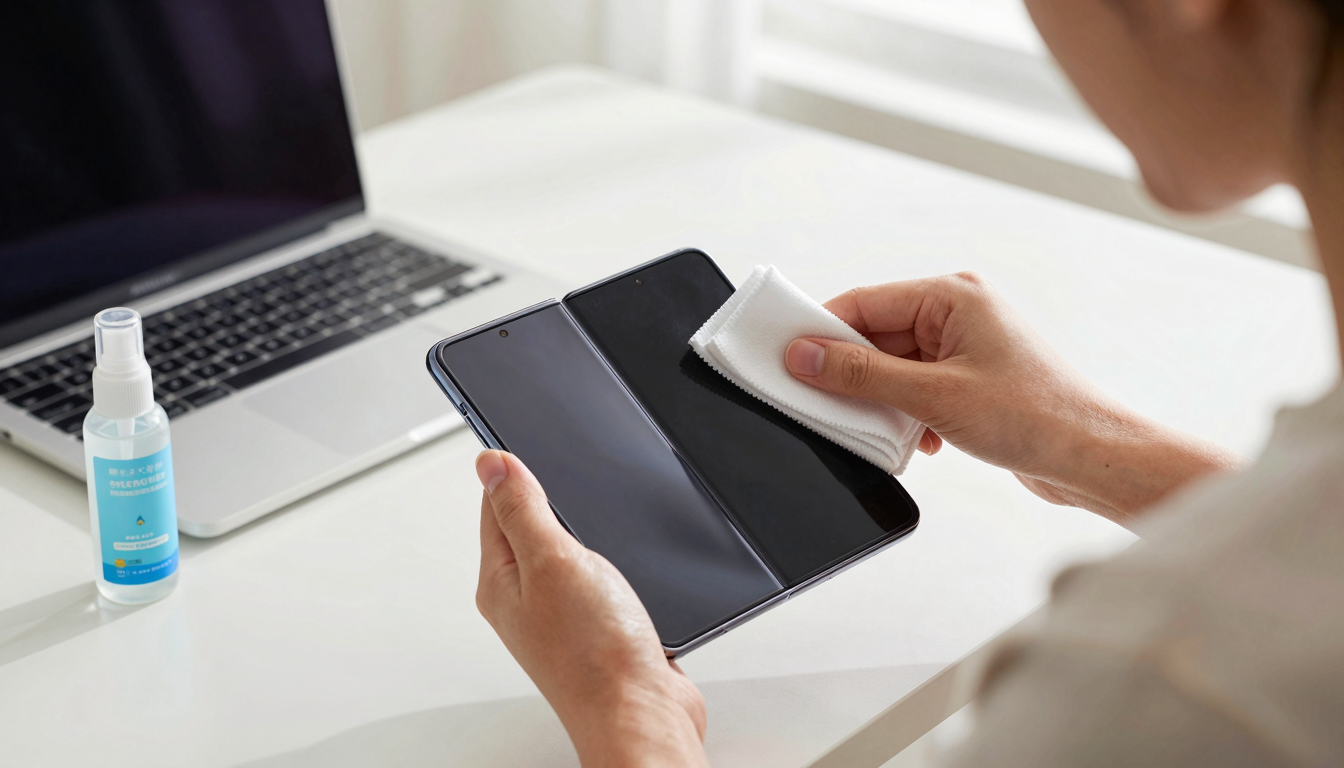
So, what's the alternative? Invest in specialized display cloths designed specifically for delicate screens. These cloths typically have a tighter weave and are made from ultra-fine fibers that minimize the risk of scratching. Before wiping, use a can of compressed air to remove any loose dust or debris. And remember, gentle pressure is key. Avoid scrubbing or pressing too hard, as this can also lead to damage.
💡 Smileseon's Pro Tip
Always inspect your cleaning cloth for any embedded particles before using it. If you see anything, discard the cloth and use a fresh one. It's a small price to pay for protecting your valuable display.
Always inspect your cleaning cloth for any embedded particles before using it. If you see anything, discard the cloth and use a fresh one. It's a small price to pay for protecting your valuable display.
👉 Recommended Reading: Cracked Screen Survival Guide: Pro Repair Tips & DIY Fixes That Actually Work
Temperature Extremes: The Invisible Enemy of Polymer Stability
Think of your foldable display like a delicate flower – it wilts under extreme heat and shatters in extreme cold. The flexible polymers that make up the display are particularly sensitive to temperature fluctuations, which can lead to a range of problems, from delamination (separation of the layers) to embrittlement (becoming brittle and prone to cracking).
High temperatures, especially prolonged exposure to direct sunlight, can cause the polymer to soften and deform. This can lead to bubbling, discoloration, and even permanent damage to the display. I remember leaving my foldable on the dashboard of my car on a particularly hot day in Phoenix. When I came back, the display had a noticeable ripple effect – a permanent reminder of my negligence. Cold temperatures, on the other hand, can cause the polymer to become brittle and more susceptible to cracking. Avoid exposing your foldable to freezing temperatures, and be especially careful when unfolding it in cold environments.
| Temperature Range | Effects on Display | Preventative Measures |
|---|---|---|
| Below 32°F (0°C) | Polymer becomes brittle, increased risk of cracking. | Avoid exposure to freezing temperatures; warm device gradually before unfolding. |
| 32°F - 95°F (0°C - 35°C) | Optimal operating range. | Maintain consistent temperature; avoid sudden fluctuations. |
| Above 95°F (35°C) | Polymer softens, risk of deformation and delamination. | Avoid direct sunlight and hot environments; store in a cool, dry place. |
| Rapid Temperature Changes | Uneven expansion and contraction of materials, leading to stress and potential damage. | Allow device to acclimatize gradually to new temperatures. |
The ideal operating temperature for most foldable displays is between 60°F and 80°F (15°C and 27°C). When storing your foldable, choose a cool, dry place away from direct sunlight. And if you live in an area with extreme temperatures, consider investing in a protective case that provides insulation and temperature regulation.
🚨 Critical Warning
Never leave your foldable display in a car on a hot day. The internal temperature can quickly exceed the safe operating range, leading to irreversible damage.
Never leave your foldable display in a car on a hot day. The internal temperature can quickly exceed the safe operating range, leading to irreversible damage.
The Case Conundrum: Protective Measures That Actually Matter
Choosing the right case for your foldable is more than just a matter of aesthetics; it's a crucial investment in the longevity of your device. But with so many options available, how do you separate the wheat from the chaff? Let's break down the key features to look for in a protective case.
First and foremost, consider the level of impact protection. Look for cases that are made from shock-absorbing materials like TPU (thermoplastic polyurethane) or polycarbonate. These materials can help to dissipate the force of a drop, minimizing the risk of damage to the display and internal components. I once dropped my foldable from about four feet onto a concrete floor. The case I had on it – a rugged TPU model – absorbed the impact, and the device survived without a scratch. Without that case, it would have been a very expensive trip to the repair shop.
| Case Type | Material | Protection Level | Pros | Cons |
|---|---|---|---|---|
| Slim Case | Polycarbonate, Thin TPU | Minimal | Lightweight, adds minimal bulk. | Offers limited drop protection. |
| Rugged Case | Thick TPU, Polycarbonate with reinforced corners | High | Excellent drop protection, durable. | Bulky, can affect grip. |
| Folio Case | Leather, Synthetic Leather with internal frame | Medium | Protects both front and back, can include card slots. | Adds significant bulk, can interfere with folding mechanism. |
| Hybrid Case | Combination of TPU and Polycarbonate | Medium to High | Good balance of protection and slimness. | May not offer the same level of protection as a dedicated rugged case. |
Beyond impact protection, consider the design and how it interacts with the folding mechanism. Avoid cases that put excessive pressure on the hinge or interfere with the smooth opening and closing of the device. Look for cases that have a hinge protection mechanism or a design that allows for free movement of the hinge. Finally, don't forget about screen protection. Many cases come with raised bezels or integrated screen protectors that can help to prevent scratches and scuffs. However, be careful when choosing a screen protector, as some can interfere with the touch sensitivity of the display.

The "Unfolding" Truth: Optimizing Hinge Mechanics
The hinge is the unsung hero (or potential villain) of the foldable display experience. It's the mechanical heart of the device, responsible for the smooth and reliable transformation from phone to tablet and back again. But like any mechanical component, it requires careful attention and maintenance to ensure optimal performance and longevity.
One of the most common issues with foldable hinges is the accumulation of dust and debris. These particles can work their way into the hinge mechanism, causing friction, stiffness, and eventually, damage. To prevent this, regularly clean the hinge area with a soft, dry brush or a can of compressed air. Avoid using liquids or solvents, as these can damage the internal components. Another important factor is the unfolding angle. While foldable displays are designed to be flexible, extreme bending angles can put excessive stress on the hinge and display, leading to material fatigue and premature failure. Avoid forcing the device open beyond its intended range of motion, and be especially careful when unfolding it in cold environments, where the polymer is more brittle.
| Hinge Issue | Cause | Symptoms | Preventative Measures |
|---|---|---|---|
| Dust Accumulation | Environmental dust and debris entering the hinge mechanism. | Stiffness, grinding noises, reduced range of motion. | Regularly clean hinge area with a soft brush or compressed air. |
| Material Fatigue | Repeated bending and stress on the hinge components. | Looseness, wobbling, hinge failure. | Avoid extreme bending angles and excessive folding/unfolding. |
| Corrosion | Exposure to moisture and humidity, leading to rust and corrosion. | Stiffness, squeaking noises, hinge failure. | Avoid exposure to moisture; store in a dry environment. |
| Misalignment | Impact or physical damage causing the hinge components to shift out of alignment. | Uneven folding, creaking noises, display distortion. | Handle the device with care; avoid dropping or subjecting it to physical stress. |
Finally, pay attention to the feel of the hinge. If you notice any stiffness, grinding noises, or uneven movement, it's a sign that something is wrong. Don't force it; instead, consult a professional repair service to diagnose and fix the problem.
The Repair Roulette: DIY vs. Professional Services Breakdown
So, disaster strikes. Your foldable display is cracked, the hinge is broken, or some other calamity has befallen your precious device. What do you do? The temptation to try a DIY repair is strong, especially with the abundance of online tutorials and replacement parts available. But is it really a good idea? Let's weigh the pros and cons of DIY versus professional repair services.
DIY repairs can be attractive because they're often cheaper than professional services. You can save money on labor costs and potentially find replacement parts at a discount. However, DIY repairs also come with significant risks. Foldable displays are incredibly complex and delicate devices, and even a minor mistake can lead to further damage. I remember attempting to replace a cracked screen on an old smartphone a few years ago. I followed the instructions carefully, but I ended up damaging the display cable, rendering the device completely unusable. It was a frustrating and expensive lesson.
| Repair Method | Cost | Skill Level | Risks | Warranty |
|---|---|---|---|---|
| DIY Repair | Lower upfront cost (parts only) | High | Potential for further damage, voiding warranty | None |
| Professional Repair | Higher upfront cost (parts and labor) | Low | Lower risk of damage, ensures proper repair | Often includes a warranty on parts and labor |
| Manufacturer Repair | Varies | Low | Guaranteed compatibility and quality, may be the only option for certain repairs | Maintains original warranty, may offer extended warranty |
Professional repair services, on the other hand, offer several advantages. They have the expertise, tools, and experience to properly diagnose and repair foldable displays. They also typically offer a warranty on their work, providing peace of mind in case something goes wrong. However, professional repairs can be expensive, and you may have to wait several days or even weeks to get your device back.
Software Strategies: Display Calibration and Burn-in Mitigation
Maintaining your foldable display isn't just about physical care; it's also about optimizing the software settings to prevent damage and prolong the lifespan of the screen. Two key areas to focus on are display calibration and burn-in mitigation.
Display calibration ensures that the colors and brightness levels are accurate and consistent. Over time, the display can degrade, leading to color shifts and uneven brightness. Calibrating the display can help to restore its original performance and prevent further degradation. Most foldable devices have built-in calibration tools, but you can also use third-party apps or professional calibration services for more accurate results. Burn-in, also known as image retention, is a phenomenon where static elements on the screen, such as icons or navigation bars, leave a faint ghost image even when they're not being displayed. This is a common issue with OLED displays, which are often used in foldable devices. To mitigate burn-in, avoid displaying static images for prolonged periods. Use dynamic wallpapers that change frequently, and enable features like automatic brightness and screen timeout.
| Software Strategy | Description | Benefits | Implementation |
|---|---|---|---|
| Display Calibration | Adjusting color and brightness settings to ensure accurate and consistent display. | Restores original display performance, prevents further degradation. | Use built-in calibration tools or third-party apps/services. |
| Burn-in Mitigation | Preventing image retention caused by prolonged display of static elements. | Prolongs display lifespan, maintains image quality. | Use dynamic wallpapers, enable automatic brightness and screen timeout. |
| Software Updates | Installing the latest software updates from the manufacturer. | Includes bug fixes, performance improvements, and new features that can enhance display performance and longevity. | Regularly check for and install software updates. |
Some devices also have features like pixel shifting, which subtly moves the pixels around to prevent static elements from staying in the same place for too long. Finally, keep your device's software up to date. Manufacturers often release software updates that include bug fixes, performance improvements, and new features that can help to optimize display performance and prevent damage.

Future-Proofing Your Investment: Emerging Display Technologies and Maintenance
The world of display technology is constantly evolving, and foldable displays are no exception. New materials, manufacturing processes, and software algorithms are being developed to improve the durability, performance, and longevity of these devices. To future-proof your investment, it's important to stay informed about these emerging technologies and adapt your maintenance practices accordingly.
One of the most promising areas of development is in the realm of display materials. Researchers are working on new polymers that are more scratch-resistant, flexible, and durable than those used in current foldable displays. Some manufacturers are also experimenting with hybrid materials that combine the best properties of polymers and glass. Another area of innovation is in the design of the folding mechanism. New hinge designs are being developed to reduce stress and strain on the display, improve durability, and enable more flexible and versatile folding configurations.
| Emerging Technology | Description | Potential Benefits | 🔗 Recommended Reading
|
|---|